Few things in life are as amazing as snowboarding. However, I recently discovered a way to make solo-riding even better… listening to music.
Of course, I’ll address the various safety concerns involved. But first, let’s talk about how to listen to music while snowboarding.
The best ways to listen to music while snowboarding are through headphones, helmet inserts or bluetooth speakers. These are all available in wireless form, providing a low-risk and comfortable solution. This year's best-in-test were the Smith x Aleck Nunchucks.
I’ve been using the Smith x Alecks for the past few seasons and they’ve been a game changer. But they’re by no means the only option.
Allow me to walk you through each specific product and how to use them.
(Make sure to save our very popular snowboard music playlist too!)
My Top Picks 2024
- The Best Overall Option: The Smith x Aleck Nunchucks
- The Amazon Bestseller: Wildhorn Alta Headphones
- The Best Budget Alternative: OutdoorMaster Headphones
- The Best Earphones: Apple AirPods (2nd Generation)
- The Best Bluetooth Speaker: The JBL Clip 3 Speakers
Disclaimer: This article contains affiliate links. We may make a commission if you make a purchase, at no additional cost to you.
Is Snowboarding With Music Safe?
Collisions on the hill happen. Two skiers, two snowboarders, a skier and a snowboarder, it doesn’t matter – it happens.
There are many factors that contribute to poor slope use – often times it’s a basic lack of knowledge or not being aware of the things to look out for.
But is listening to music one of the main causes? Is it irresponsible? Or is it simply another way of enhancing the ride…
Let’s be honest. If you’ve got music playing in your ears – it’s harder to hear what’s going on around you. This makes you less aware.
Can you argue with that?
No, not really. However, I’d argue that experienced riders are already much more aware of their surroundings, even with their hearing impaired.
There are probably snowboarders out there right now on the mountain, riding with music playing loud, and they’re still more aware than the average slope user. Safer to those around them. More considerate. More aware.
However, there will also be riders out there who shouldn’t really be listening to music.
How To Listen To Music Safely While Snowboarding?
Basically, only listen to music if you’re a confident snowboarder with adequate awareness of your surroundings. Be aware that your hearing is impaired. Use your other senses. Consider turning the volume down a few notches. Don’t be an idiot.
Snowboard with music at your own risk.
Best Ways To Listen To Music While Skiing Or Snowboarding
1. Drop-In Headphones For Helmets
Drop-In headphones (or “chips”) are the best way to listen to music while snowboarding. These audio-inserts will sit neatly within the ear-pads of your helmet.
This solution is particularly good as you can never lose them. They also don’t fully obstruct your ears.
In the past, the difficulty was finding a compatible helmet. Nowadays most reputable helmet brands are “audio-ready”. Check your helmet before ordering!
Here are the best drop in headphones for skiing and snowboarding.
- WIRELESS HIGH FIDELITY HELMET AUDIO - Thanks to its 40mm titanium drivers that are optimized for crisp highs and powerful bass, the Nunchucks bump. The Audio Lab inside the Aleck app includes a powerful EQ so you can fine-tune your signature sound.
- UNLIMITED RANGE GROUP COMMUNICATION - Choose the open channel Party Mode or Push-to-Talk Mode for the group. Have a modest cell signal? Your group has unlimited range comms and no line-of-sight limitations.
- MULTI-DAY 18 HOUR BATTERY - You can listen and chat all day, and all night long with the impressive 18-hour USB-C rechargeable lithium-polymer battery. Plug in and you’re fully charged in only 1-hour.
- UNIVERSAL HELMET FIT - Thinner and more comfortable than its predecessor, the Nunchucks are low-profile and lightweight so they are compatible with any audio-ready snow helmet—and on the DL ... most snow helmets are audio-ready.
The Smith x Aleck Nunchucks is a specialized audio system for skiing and snowboarding.
The system integrates seamlessly into your helmet, providing an unobtrusive and streamlined way to listen to music.
Utilizing Bluetooth technology, the Nunchucks allow for wireless connectivity to your smartphone or other devices, making it convenient to play music, receive calls, or use navigation apps without the hassle of wires.
One of the standout features is the ease of use. The controls are designed to be user-friendly, enabling you to adjust volume, skip tracks, or answer calls without removing your gloves.
Pros:
- Seamless helmet integration
- Wireless Bluetooth connectivity
- High-quality audio
- Easy-to-use controls
- Durable and weather-resistant
- Safety-focused design
- Good battery life
Cons:
- Higher price point
- Adds some weight to helmet
- Less sound isolation
No products found.
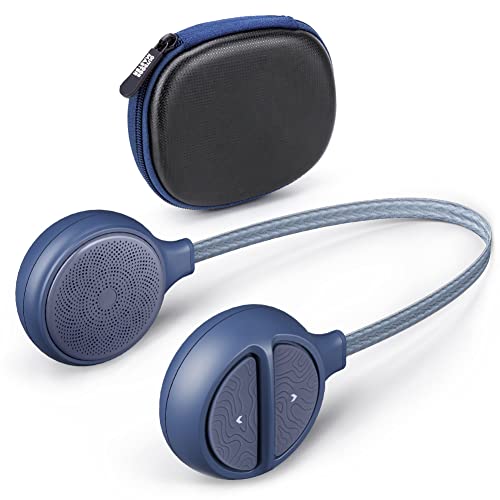
The Wildhorn Alta have solidified their spot as the best rated drop-in headphones on Amazon. They offer surprisingly good audio, a solid bluetooth connection and compatibility with a wide-range of helmet brands. They are slightly tricky to use with gloves on, but overall, they do a pretty good job.
Pros:
- Best-rated on Amazon
- Decent sound
- Recharges quickly
- Good value
- Prime delivery
- 10 hours playtime
Cons:
- You have to remove them from the helmet each time they need charging.
- Buttons are a little fiddly, especially with gloves.
- Can’t compete with Smith in terms of sound quality.
- Clean Sound, Clear Highs, Big Bass.
- Skiing/Snowboarding Friendly Control. Three glove friendly buttons adjust volume, change tracks, play, pause, take calls and use Siri (voice control) through the built-in microphone.
- Built-in microphone allows you to keep riding pow whilst answering calls.
- Universal Helmet Compatibility - Minimal designed headset with 12.2 inch cord fits most audio ready ski/snowboard helmets including Giro, Smith, Burton, K2, POC, Anon and even motorcycle helmets.
- Rugged Design for All Conditions.
- IP45 sweat-resistance material and tested working perfectly at -20°C/-4°F. Up to 15 hrs play time & 500 hrs standby time.
The OutdoorMaster Drop-In Headphones provide the best bang for your buck. At the time of writing, they’re on sale for just $60.
They are hard-wearing, have a great bluetooth connection and offer good audio quality. Their buttons are easier to use than the Wildhorn offering and they can also be charged without taking them out of your helmet each time.
Pros:
- Great value for money
- Reliable bluetooth connection
- Large, easy to use buttons
- Chargeable without removing them from your helmet.
- Hard-wearing
- 15-hours playtime, 500 hours of standby.
Cons:
- Slightly bulky, can be uncomfortable over time in certain helmet brands
Discount Code: Get an additional 15% off at OutdoorMaster with code SBDAYS15
2. Earphones
One of the best ways to listen to music while snowboarding is with earphones. In the past, those pesky wires would get in the way. With the release of true wireless earphones, these problems were fixed!
Let’s take a look at the best earphones for snowboarding.
No products found.
These are one of my favorite audio solutions while snowboarding. They are low profile, comfortable and have pretty good audio overall. They also let you pick up any urgent calls whilst riding.
The 2nd generation includes tap controls, which are a game changer. Simply tap the outside of your beanie or helmet to control your music – you can also customize what action tapping each earbud will have.
The main problem is that they’re very easy to lose… as my other half has kindly demonstrated on several occasions!
Fortunately, wearing a beanie or helmet tends to keep them in place. But if you take a particularly gnarly fall, they’re still at risk.
A quick fix for this is using Airpod Hooks. This has worked for me so far! Tip – Get the brightly colored ones. If they do fall out, they’ll stand out in the snow.
Pros:
- also useable off the mountain
- excellent signal
- good audio
- handy case
- external controls are great
Cons:
- high risk of losing one, grab some AirPod Hooks to prevent this!
Update 2024: You may be reading this wondering why the latest model (3rd generation) AirPods weren’t recommended. Well, because the 2nd generation work perfectly fine and are $60-80 cheaper – in case of disaster!
3. Bluetooth Speakers for Skiing and Snowboarding
At the risk of becoming public enemy number one, bluetooth speakers are another of the best ways to listen to music while snowboarding.
They have the added benefit of also providing music for your friends.
As they do not obstruct your ears, they also leave you more aware of your surroundings.
The important thing with speakers is to choose a product small enough to be portable. This also reduces the risk of the speaker injuring you during a fall. I used to carry a large speaker in my backpack… I learned the hard way why this was a bad idea!
After testing dozens of speakers over the years, there is one clear winner for this category…
No products found.
The JBL Clip 3 is easily the best bluetooth speaker for skiing and snowboarding. It’s small enough to clip to the outside of your backpack and not even notice it.
It’s also hard-wearing, waterproof and packs a punch (not that you’ll want to play it at max volume).
Pros:
- Great sound for the size!
- Waterproof and durable
- Sturdy carabiner
- Excellent reviews
- 10+ hours playtime
Cons:
- You’re unlikely to hear the music whilst riding fast – due to the wind and snow noise.
Note: Even if you don’t use them for skiing and snowboarding, these are a great accessory to have. We use them for hiking, trips to the beach, dog walks, vacations etc.
Final Thoughts
Those were the best ways to listen to music while snowboarding. Which one are you going to try?
Personally, I use a mixture of methods depending on the day.
Riding with friends? I’ll be taking my speakers along. Riding solo – then it’s my earphones or drop-in’s.
That’s all for now.
As always, happy riding!


2 comments
Have you tried noise cancelling headphones while snowboarding?
Hey. I use my airpods sometimes… but always turn the noice cancelling feature OFF. You definitely want some of the background noise to get through (for safety reasons).